
Congratulations, you just upgraded to Video DownloadHelper 7.4.0 for Firefox
 Vidine
Manage your collections of downloaded videos with thumbnails and metadata
 Video DownloadHelper 7 for
Chrome
Video DownloadHelper 7 for
Chrome
 Kiva
Kiva340 Video DownloadHelper users lent $256780 to real people 7717 projects
New: Video DownloadHelper is now available for
Edge (Chromium) on Windows and Mac !
Changes from 7.3.9
In some situations, on sites streaming separately video and audio, Video DownloadHelper is not able to recognize both streams as being parts of the same media and does not offer automatic aggregation. As a result, the user may end up with an audio or video-only file, depending on the chosen variant. When an audio-only and a video-only file have been downloaded, it is now possible to use the local aggregation tool to merge those two files to a single audio-video media file.
Usage
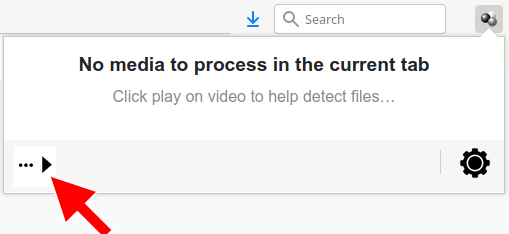
Pass the mouse over this icon to reveal the toolbar
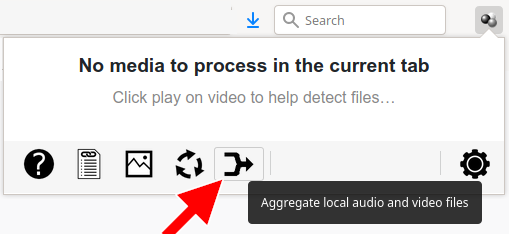
Click the  icon to initiate the
aggregation operation
icon to initiate the
aggregation operation
or
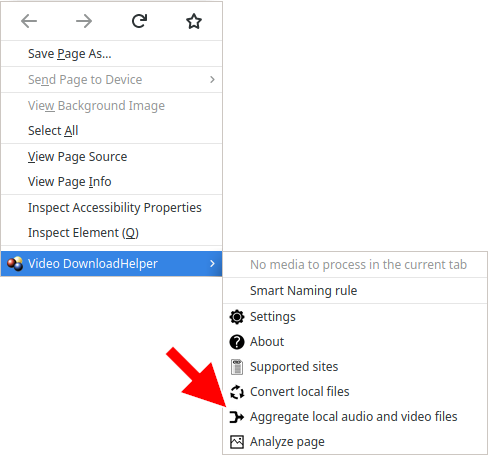
Right-click in the page to open the context menu and pick the Aggregate local audio and video files item
Then you will be prompted for the input file containing the video stream, the input file containing the audio stream, then the output file that will contain both the video and audio streams. Note that the input video file may contain an audio stream and the input audio file may contain a video stream. Those streams would just be ignored.
Thanks to breadfan
Thanks to zsombor
This issue happened with some HLS-streamed videos containing garbage data. An infinite loop caused the extension to crash.
The counterpart is that, by default, the video starts being recorded when the user requests the download. Previous behaviour, i.e. video is recorded from the moment it loads in the page, can be reinstalled by setting parameter HLS live history to false.
Many thanks to our contributors ! You too can contribute to providing, completing or improving Video DownloadHelper locales.